


Verify and correct ECU checksums online
Chiptune BIN verifies the checksums of an ori or a version, then downloads the mod with its checksums recalculated. Correction only happens when the algorithm is proven on the ori. Cryptographic signatures are never modified.
Free Discovery plan with a ChiptunePRO account. Comparison, checksums, imports and download are part of the Pro plan.
Recognized families
- Bosch ME7 (VAG) and ME7.2 Porsche.
- Bosch MED17 / EDC17: Bosch blocks with headers, including ME17 and MEVD17.
- Bosch EDC15: VAG V4.1, EDC15VM+, MSA15, EDC15M BMW.
- Bosch EDC16 and MED9.
- Bosch Motronic M1.x, M2.3 and M5.9.
- Bosch motorcycle: MSE8 and MG1.
- Continental Simos 8.5, 10, 12, 16 and 18 (18.1, 18.6, 18.10, 18.41).
- Siemens MS41, MS42, MS43, MSS54 and MSS54HP (BMW).
- Denso Subaru and Mazda, Mitsubishi CAN, Mazdaspeed6, Nissan and Infiniti (Hitachi), Suzuki and Yamaha motorcycles.
- GM P01, P59, P10 and E54, Ford EEC-IV, Chrysler NGC3.
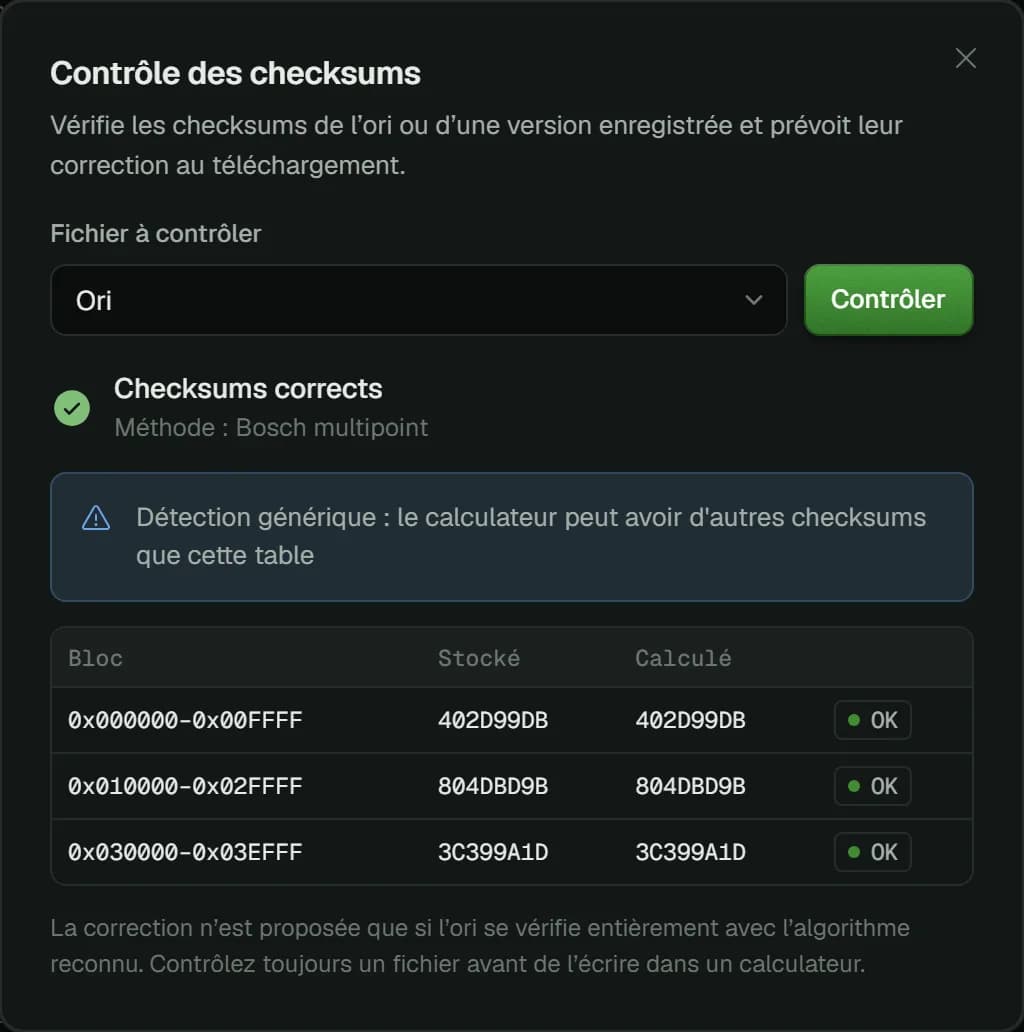
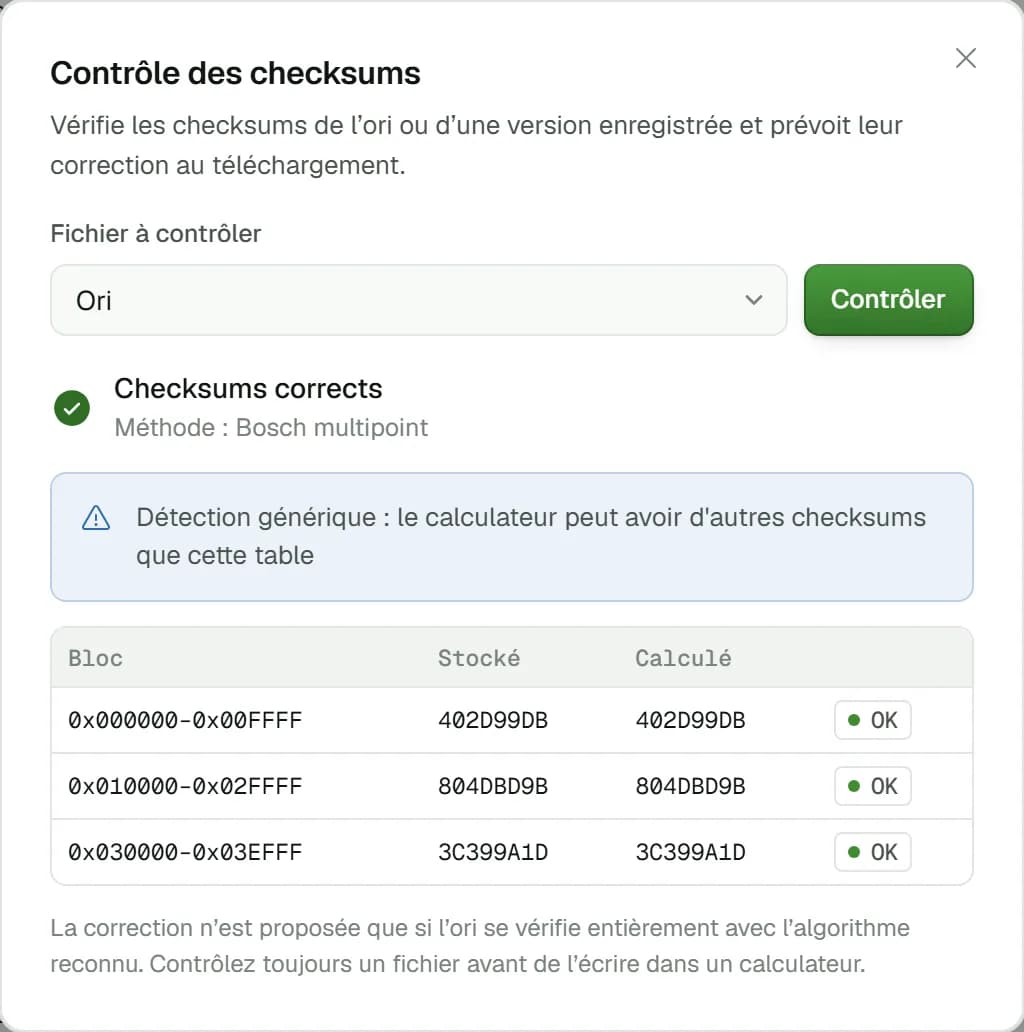
- Bosch multipoint, a generic check used when no specific family is recognized.
The family is detected from the file content, not from its name. The report states when detection has medium confidence.
Verifying a file
The check opens from the editor, on the ori or on a version. The report gives the recognized family, then for each check the covered area, the stored value, the computed value and the state: correct or wrong.
If no family matches, the report says so. Chiptune BIN does not guess an algorithm.
Checking the ori before any change is useful: an ori whose checksums are already wrong points to an incomplete read or a file that was already modified.
Before download, the checksum state also appears in the file check, together with changes outside maps, saturated values and axes that are no longer monotonic.
Correcting on download
Correction is chosen when you download a version. It follows six rules.
- Family, variant and structure are detected on the ori, then applied to the mod.
- The ori must fully verify with that algorithm. Otherwise, correction is refused.
- An inconsistency found by the family, such as an ME7 CRC table that was already modified, blocks correction.
- For families where only some areas are checked (Motronic), a change outside those areas blocks correction.
- After correction, everything must verify, a second pass must change nothing, and only checksum locations may have changed.
- Cryptographic signatures are never touched.
If correction is refused, the reason is shown and the file can be downloaded as is.
Signatures: what is left to your writing tool
MED17 / EDC17, EDC16, some ME7 and Simos 12, 16 and 18 carry an RSA signature. Chiptune BIN corrects the simple checksums and reports whether a signed area has changed.
In that case, the signature is no longer valid. The ECU may refuse the file if your writing tool does not handle the signature.
What requires Pro
Checksum verification and correction are part of the Pro plan, like downloading the modified file. The Chiptune BIN Pro plan is included in the ChiptunePRO Pro plan.
With the Discovery plan, you open a file, see its maps and edit them on one remap.
Frequently asked questions
Yes, with Pro, for recognized Bosch MED17 / EDC17 blocks: ADD32 and ADD16 sums, CRC-32. The RSA signature is not recalculated.
Read the reason shown: an ori that does not verify, a different structure, a change outside the checked areas. The file can be downloaded as is and corrected by your writing tool.
No. Saved versions keep the bytes you changed. Correction is applied to the downloaded copy, when you ask for it.
No. After correction, Chiptune BIN checks that only checksum locations have changed. Otherwise, it refuses the correction.
The report states that no checksum is recognized, and the file downloads as is. You can write to contact@chiptunepro.com with the ECU reference.
Read next
- WinOLS alternativePrice, system, imports, checksums and versions compared with WinOLS, plus what Chiptune BIN does not do.
- Compare two filesOri and mod side by side, reads of different sizes aligned, changed areas outside maps.
- XDF, A2L, DAMOS, WinOLSDefinition formats read in the browser, their limits, and exports to WinOLS or TunerPro.
Try it on your own file
Create a ChiptunePRO account, open the editor and drop a read. The Discovery plan is enough to see your maps as hex, tables and curves.